YouTube TV costs $82.99 a month for the Base Plan. Cheaper genre plans start at $54.99 a month. New subscribers often get a lower rate for the first few months, and every plan bills month to month with no annual contract.
That covers the short version. Below is everything else you need to know about YouTube TV subscriptions, including plan pricing, add-ons, how to manage your account, and how to cancel step by step.
YouTube TV Plans & Pricing at a Glance
| Plan | Monthly Price | New Subscriber Rate | Local Channels? | Best For |
|---|---|---|---|---|
| Base Plan | $82.99 | $67.99 (first 3–5 months) | Yes | Full lineup, sports, news, and entertainment |
| Sports Plan | $64.99 | $54.99 (first year) | No | Viewers who mainly watch live games |
| Entertainment Plan | $54.99 | $44.99 (first 3 months) | No | Reality, comedy, and lifestyle shows |
| News + Entertainment + Family | $69.99 | $59.99 (first 3 months) | No | Households with kids that also want news |
Prices and promo lengths change from time to time, so treat this table as a starting point and confirm the current rate at sign-up.
YouTube TV Subscription Cost Explained
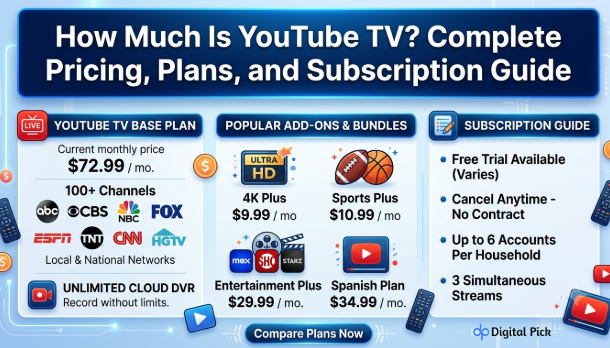
YouTube TV has raised its price a few times over the past two years. The Base Plan now costs $82.99 per month. That price gets you over 100 live channels, unlimited cloud DVR storage, and room for up to six accounts on one membership.
Most new subscribers don’t pay full price right away. YouTube TV runs a rolling promotion that drops the monthly rate for a set number of months, usually three to five, before it moves up to the regular rate. Check the sign-up page for the current offer, since the discount and length change over time.
If you paid full price for a whole year with no discount, that would add up to $950.88. YouTube TV doesn’t sell an annual plan, so every subscriber gets billed month to month. That works in your favor if you want to cancel without a long-term commitment holding you back.
YouTube TV Base Plan Subscription: What You Get
The Base Plan is what most people mean when they ask about a YouTube TV subscription. Here’s what $82.99 a month includes:
- Over 100 channels, including ABC, CBS, NBC, Fox, and PBS in most markets
- Unlimited cloud DVR storage, with recordings kept for up to nine months
- Up to six accounts per household, each with its own profile and recommendations
- Three streams running at the same time, so more than one person can watch at once
This plan fits households that watch a mix of sports, news, and prime-time shows. If you only care about one or two of those categories, a smaller plan will cost you less.
Cheaper YouTube TV Plans: The Genre Options
Early in 2026, YouTube TV added smaller, genre-based plans that cut the bill for people who don’t need the full channel lineup.
Entertainment Plan – $54.99/month Roughly 60 channels built around comedy, reality shows, and lifestyle content, including FX, Bravo, Comedy Central, and HGTV. Local broadcast networks are not included.
Sports Plan – $64.99/month Made for viewers who mainly watch games. It covers the major sports networks, though local broadcast channels aren’t part of this plan either.
News + Entertainment + Family Plan – $69.99/month Adds kid-friendly and family channels such as Nickelodeon, Disney Channel, and National Geographic, along with news and entertainment programming.
If local channels matter to you, for live network shows, local news, or Sunday football, the Base Plan is still the only option that carries them. Switching from the Base Plan down to a genre plan also affects saved recordings. If a show came from a channel that isn’t in your new plan, that recording becomes unavailable right away. You get a 21-day window to switch back to the Base Plan and recover those recordings before they’re gone.
YouTube TV Add-Ons and Bundles
Past the core plans, you can add extra channels for a set monthly fee:
| Add-On | Price | What It Adds |
|---|---|---|
| Sports Plus | ~$10.99/month | NFL RedZone, Fox College Sports, Stadium, and more |
| Entertainment Plus | ~$29.99/month | Max, Paramount+ with Showtime, and Starz bundled together |
| 4K Plus | Varies | Higher resolution streaming and extra concurrent streams |
| Premium channels (individual) | From ~$1.99/month | Single networks, priced separately by each channel |
You can add or drop these anytime, and they run separately from your main plan.
Does YouTube TV Still Offer a Free Trial?
YouTube TV has offered free trials in the past, sometimes lasting up to 21 days. Trial length and availability shift often, so check the sign-up page first. If you start a trial and decide it’s not for you, cancel before it ends. Access continues until the trial runs out, but you won’t get charged if you cancel in time.
How to Manage Your YouTube TV Subscription
Managing your plan takes just a few clicks once you know where to look.
- Go to tv.youtube.com on a computer or phone browser, and sign in with your Google account.
- Click your profile photo in the top right corner.
- Select Settings from the dropdown menu.
- Click the Membership tab on the left side of the page.
- To switch plans, click Manage next to your current plan, then pick a new one.
- To add or remove an add-on, find it in the same Membership section and click Manage.
- To update your payment method, go to Purchases & Payments under Settings.
Plan changes usually take effect on your next billing date, not right away. If you’re on a genre plan and want the Base Plan back, remember the 21-day window for recovering recordings you might lose.
How to Cancel Your YouTube TV Subscription
Canceling a YouTube TV subscription works through the same Membership settings, whether you originally signed up on the website or through an app.
- Open a browser and go to tv.youtube.com. Sign in to the account tied to your subscription.
- Click your profile photo in the top right corner.
- Select Settings and then click Membership.
- Find your Base Plan or the add-on you want to end, and click Manage.
- Choose Cancel Membership.
- You may see a pause option first. If you want to fully cancel, skip past it and confirm.
- Follow the remaining prompts. A confirmation email arrives once it’s finished.
A few things to know before you cancel:
- No refunds for partial months: YouTube TV doesn’t prorate charges, so you keep access through the end of your current billing period, even after canceling.
- Third-party billing needs a different path: If you signed up through Apple, Google Play, Verizon, or another carrier, cancel through that provider instead of tv.youtube.com. YouTube TV can’t cancel a subscription it doesn’t bill directly.
- Add-ons don’t cancel on their own: Ending your Base Plan won’t remove paid add-ons. Cancel each one separately if you want your bill down to zero.
- Access doesn’t end the moment you cancel: This applies to free trials too. You keep access until the trial or billing period runs its course.
Which YouTube TV Plan Fits Your Household
With four plan options now available, picking the right one comes down to what you actually watch.
- Base Plan: If you like to watch local news, live network sports and a variety of channels, this is the best for you. This is the only plan that includes everything.
- Sports Plan: If you pay money for TV mainly to watch live games, it’s best.
- Entertainment Plan: If you mostly watch reality shows, comedy and lifestyle content, this is the best.
- News + Entertainment + Family Plan: Best for families who have children and who also want news coverage.
If you’re not sure yet, start with a lower-cost plan and upgrade later. Switching up to the Base Plan is instant, and it protects any recordings that would otherwise expire under a smaller plan.
YouTube TV Subscriptions for Multiple Users
One YouTube TV subscription covers the whole household. Up to six people can create their own accounts under a single membership, each with a separate profile and DVR queue. Everyone shares the same channel lineup and billing, but nobody sees anyone else’s watch history. That makes YouTube TV subscriptions a reasonable option for families splitting the cost.
What Happens After You Cancel
Your account stays active until the period you already paid for ends. After that, your recordings, live channels, and DVR library become unavailable. Your account itself doesn’t get deleted, so you can start a new YouTube TV subscription later without setting everything up again from scratch.
The Bottom Line
YouTube TV costs $82.99 a month for the full Base Plan, or as little as $54.99 a month if a genre plan covers what you actually watch. New subscribers usually get a discount for the first few months, and every plan runs month to month with no contract locking you in.
That last part matters most. Since there’s no annual commitment, you can test a plan, switch it, or cancel it without losing money on a term you didn’t finish. If you’re not sure which plan fits, start small and upgrade to the base plan later. If YouTube TV isn’t working out at all, canceling takes five minutes through Settings > Membership, and you’ll keep access through the rest of your billing period either way.
Frequently Asked Questions
A: The Base Plan costs $82.99 a month. Genre plans start at $54.99 a month, and new subscribers often get a lower rate for the first few months.
A: Yes. The Entertainment Plan, Sports Plan, and News + Entertainment + Family Plan all cost less than the Base Plan, though none of them carry local broadcast channels.
A: Yes. There’s no annual contract. You can cancel your YouTube TV subscription anytime through Settings > Membership, and you’ll keep access until your current billing period ends.
A: No, YouTube TV doesn’t give pro-rated refund. You maintain access to the end of the period for which you have already paid.
A: Go to Settings> Membership and find the add-on you want to change. Click on ‘Manage’ to update or cancel it.
A: No. Add-ons like Sports plus or 4K plus will have to be cancelled separately by going to the same membership section.
A: Recordings of channels not included in your new plan will not be available immediately. You have 21 days to go back to the base plan and get them back.